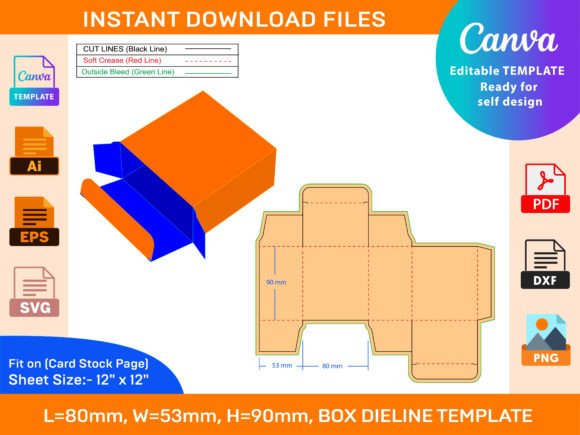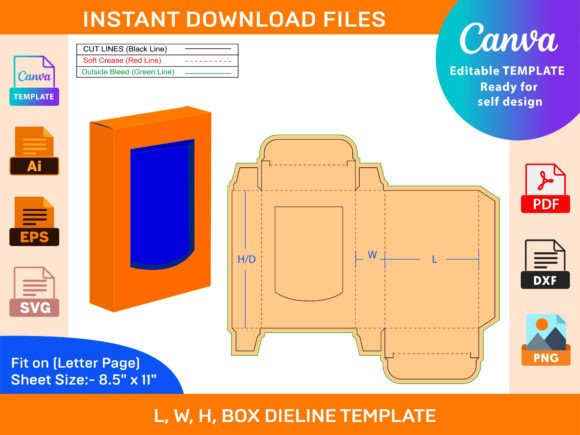
Tuck End Box with Transparent Window: A Creative Packaging Solution
What Is a Tuck End Box with Transparent Window?
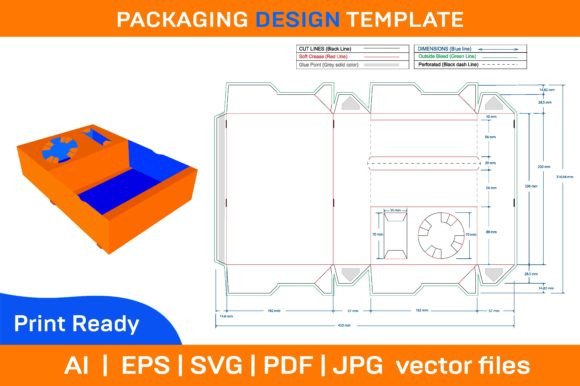
A Tuck End Box with Transparent Window is a type of folding paper box designed for both functionality and visual appeal. The tuck-end construction allows the box to be assembled without the need for glue or tape, making it an efficient and eco-friendly choice for packaging. What sets this design apart is the transparent window — a cut-out section that reveals part of the product inside, offering a sneak peek while maintaining a polished look. This kind of box is commonly used in retail, gift-giving, and promotional materials. Its clean lines and customizable nature make it ideal for showcasing items such as cosmetics, jewelry, electronics, and more. Whether you're designing for a brand or personal project, the Tuck End Box with Transparent Window provides a professional finish that can elevate your presentation.Why It’s a Must-Have for Designers and Creators
The beauty of the Tuck End Box with Transparent Window lies in its adaptability. With a ZIP archive containing SVG, PDF, EPS, and AI files, you gain access to high-quality vector designs suitable for a wide range of creative software like Photoshop, Illustrator, Silhouette Studio, Cricut Design Space, and AutoCAD. These formats ensure that your final printed product maintains crisp edges and vibrant colors regardless of size or printing method.Key Features That Make It Stand Out
- High-resolution files (300 dpi): Ensures sharp, clear prints every time.
- Instant download: Get started right away after purchase.
- Printable on any paper: Choose between matte, glossy, or textured finishes for different effects.
- Customizable elements: Modify colors, patterns, and images to match your theme or brand identity.
- Easy assembly: Designed to fold and tuck neatly, no glue required.
Unleashing Creativity: Ideas and Applications
For many creators, the challenge isn’t just in making something beautiful but also in doing so efficiently and affordably. The Tuck End Box with Transparent Window offers a unique canvas where form meets function. Here are some practical ways to use this versatile template:1. Retail and E-commerce Packaging
If you're running a small business or launching a new product line, these boxes can serve as eye-catching retail packaging. The transparent window lets customers see what's inside before purchasing, which can increase confidence and reduce hesitation at checkout. For example, a candle shop could use these boxes to display their scented candles, highlighting the color of the wax or the texture of the label.
2. Event and Wedding Favors
Event planners and wedding coordinators often look for elegant yet simple packaging solutions. These boxes can hold favors like mini soaps, chocolates, or custom keychains. You can print them with event themes, logos, or even QR codes linking to digital thank-you notes or social media pages.
3. Educational Tools and Teaching Aids
Teachers and educators can use these boxes creatively in classrooms. They can be transformed into interactive learning tools by inserting flashcards, puzzle pieces, or sample materials through the transparent window. Their portability and durability make them great for hands-on activities and student projects.
4. Customized Gift Boxes for Bloggers and Influencers
Bloggers and content creators who collaborate with brands for giveaways or unboxing videos can benefit from having a consistent and stylish packaging solution. These boxes can be branded with their logo or theme, helping to reinforce their visual identity and create a memorable experience for viewers.
5. Hobbyist Projects and Art Displays
Hobbyists, especially those into origami, papercraft, or handmade gifts, can enjoy experimenting with the 3D structure of the box. The transparent window adds a dynamic element to displays, allowing you to highlight specific parts of your creation while keeping the rest protected. Imagine using one to showcase a miniature sculpture or a layered collage.
How Different Users Can Adapt the Template
Whether you’re a seasoned designer or a first-time user, the Tuck End Box with Transparent Window template is built to accommodate varying levels of expertise and needs.Designers and Print Shops
Professionals working with clients can leverage the multiple file types to integrate the box design seamlessly into their workflow. The AI and EPS files are ideal for detailed editing, while the SVG format works well for digital cutting machines. By using the included dieline template, you can ensure precise alignment of text, graphics, and the transparent window during production.
Entrepreneurs and Small Business Owners
As an entrepreneur, you can use this template to maintain a cohesive brand image across all your products. Simply replace the default design with your logo, product image, or themed illustrations. The ability to print on any colored paper means you can align the box with seasonal promotions, product launches, or special events.
Marketers and Promotional Strategists
Marketing teams looking to distribute samples or branded merchandise can use these boxes to enhance visibility. The transparent window acts as a silent salesperson, drawing attention to the product without needing additional text or labels. Combine this with bold colors and minimalist typography for maximum impact.
Freelancers and Publishers
Freelance designers and publishers can incorporate the box into packaging for art books, zines, or self-published works. Use the transparent window to feature a sample page or illustration, inviting potential buyers to take a closer look. The 3D aspect also makes it suitable for book covers or portfolio presentations.
Practical Tips for Customization
To get the most out of your Tuck End Box with Transparent Window, consider the following best practices when customizing the template:- Plan Your Layout: Before adding images or text, sketch out how you want the final product to look. The transparent window should frame the most visually appealing part of your item.
- Choose High-Quality Images: Since the window will reveal a portion of your product, ensure the visuals are sharp and relevant. Avoid overly busy backgrounds that may distract from the item being displayed.
- Use Contrasting Colors: If you're printing on colored paper, select hues that complement or contrast with the product inside. This helps it stand out and enhances the overall aesthetic.
- Test the Fold: Always test the folded box to confirm the tuck ends lock properly and the window remains intact. Minor adjustments in the template can improve usability and durability.
- Optimize for Printing: Check the bleed and margin settings if you plan to send the design to a printer. The included PDF dieline can help you visualize how the final product will appear once printed and folded.
Real-World Examples of Usage
Here are a few realistic scenarios where the Tuck End Box with Transparent Window has been successfully applied:Cosmetics Brand Launch: A skincare startup uses the box to package their signature serum bottle. The transparent window shows off the bottle’s sleek design and deep amber liquid, encouraging customers to associate quality with the visual appeal.
Wedding Favor Box: A couple chooses the box for their guests’ favors. They print it in ivory with gold foil accents and insert personalized sugar cubes wrapped in tissue paper. The window highlights the delicate wrapping, making each favor feel special.
Educational Kit: A teacher creates a set of science kits for students. Each box contains a specimen card visible through the transparent window, prompting curiosity and engagement during classroom activities.
Getting Started: Steps to Success
If you're ready to begin, here’s a quick guide to creating your own Tuck End Box with Transparent Window:- Download the Files: After purchase, the ZIP archive is instantly available for download. Extract the contents to access SVG, PDF, EPS, and AI files.
- Select Your Software: Open the appropriate file in your preferred design tool. Adobe Illustrator users might find the AI version easiest to modify, while Silhouette Studio users will appreciate the SVG format.
- Edit and Customize: Adjust the dimensions, colors, and imagery to suit your project. Keep the transparent window area free of ink or toner to allow visibility of the product inside.
- Print and Assemble: Print the design on your chosen paper stock, then carefully cut and fold along the provided lines. The tuck-end mechanism ensures a secure fit with minimal effort.
- Test and Refine: Create a prototype and test it with the intended product. Make any necessary tweaks to the layout or materials for optimal results.